
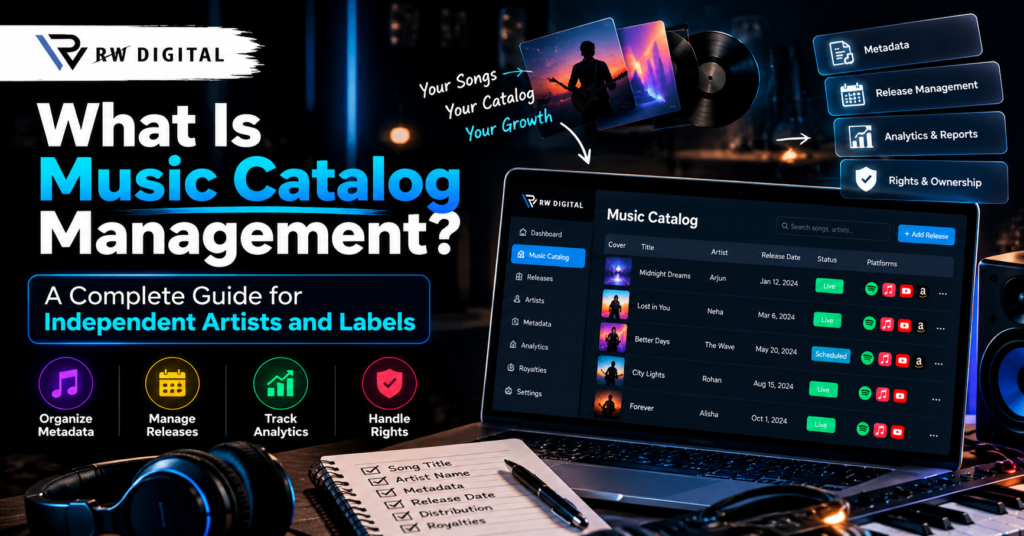
Your Music Is More Than Songs
Imagine you are an independent artist who has released ten songs. Your music is on Spotify, YouTube Music, Apple Music and other streaming platforms. Now imagine releasing another twenty songs over the year.
How will you keep track of every release? Where will you store song titles, artist credits, release dates, cover artwork, recording codes and royalty reports? What if you need to fix an artist name or check a release status?
This is where Music Catalog Management becomes important.
A music catalog is more than a collection of songs. It holds recordings, release information, metadata, ownership records and other details that help artists and labels manage music in a way.
For an artist an organised catalog can make music distribution easier to manage. For a record label it can keep information about artists and hundreds of releases organised and easy to access.
In this guide you will learn what a music catalog is, how Music Catalog Management works, which mistakes to avoid and how the right music distribution workflow can help you manage music efficiently.
1. What Is a Music Catalog?
A music catalog is an organised collection of music recordings and the information that is linked to them.
It may belong to an artist, record label, producer, distributor, publisher or another music rights holder.
A catalog can contain a singles or thousands of recordings. Its size depends on how music an artist or organisation manages.
For example imagine a record label with three artists. Each artist has released five songs. The label has fifteen recordings to manage, along with their artwork, release dates, metadata, rights information and performance reports.
Of searching through different folders and spreadsheets the label can maintain an organised catalog that brings these records together.
A music catalog may include:
- Song titles and artist names
- Audio files and approved versions
- Album and single artwork
- Release dates and distribution status
- ISRCs and other relevant identifiers
- Songwriter, producer and contributor credits
- Master recording ownership and licensing records
- Available streaming analytics and royalty reports
Not every catalog contains all these details in one system. The exact information depends on the artist, label, distributor and tools being used.
2. What Is Music Catalog Management?
Music catalog management is the process of organising, maintaining, updating and tracking a music catalog through its life.
It helps artists and labels keep their release information accurate find files when needed manage rights documentation and prepare recordings for distribution.
Think of it like managing a library. Every book in a library needs a title, author, category and location. Similarly every music release needs identification, artist information, files and relevant records.
Without management a growing catalog can become confusing. You might have files, incomplete credits, incorrect release dates or missing ownership documents.
With a process you can identify these problems earlier and reduce unnecessary manual work.
Why Does Music Catalog Management Matter?
A well-organised catalog can help you:
- Prepare music for distribution.
- Find release information quickly.
- Reduce metadata mistakes.
- Maintain records of ownership and licensing.
- Review streaming and royalty reports.
- Plan music releases.
- Manage a growing collection of artists and recordings.
Music Catalog Management does not automatically generate streams or guarantee royalties. Its purpose is to help keep the information and processes behind your music organised.
3. What Information Should Every Music Catalog Contain?
A useful catalog starts, with records. You do not necessarily need software to begin; a carefully maintained spreadsheet can work for a small catalog.
Here are the main categories to consider.
A. Track and Artist Information
Record the song title, primary artist, featured artists, version, language and genre where relevant.
For example a radio edit and an extended version of the song should not be treated as interchangeable files without checking their release details and identifiers.
B. Music Metadata
Music metadata describes a recording and its release.
Music metadata helps platforms and distribution systems identify and display music correctly.
Common metadata fields include:
- Track title
- Primary and featured artists
- Release title
- Release date
- Genre and language where supported
- Songwriter and producer credits
- ISRC for a sound recording
- UPC or EAN for a release, where applicable
Accurate music metadata management reduces avoidable confusion during submission.
Accurate music metadata management helps maintain catalog records.
C. Audio and Artwork Files
Keep approved audio files separate from demos, unfinished mixes and alternate versions.
Use filenames, consistent folder structures and appropriate artwork records.
Also maintain backups of original files.
D. Rights and Ownership Information
Maintain contracts, licenses, contributor agreements, sample permissions and ownership records.
This is especially important when multiple artists, producers, songwriters or labels are involved.
Having a recording in your catalog does not automatically prove that you own all its rights.
Keep the documentation and confirm permissions before distribution or monetization.
E. Distribution and Financial Records
Record where a release was submitted its release date, its current status and any corrections that were requested.
You can also organize streaming reports, royalty statements, reporting periods and payments.
Remember that streaming analytics and royalty reports are types of information.
4. How Does Music Catalog Management Work in Practice?
Let’s take an example.
Suppose an independent label manages 50 songs from 10 artists.
The label wants to release music regularly but struggles to track which songs are ready which need corrections and which are already live.
A simple catalog management workflow can solve much of this confusion.
Step 1: Create a Master Catalog
Create one record for every release.
Assign each release an internal reference and record the official artist, title, version and release date.
This becomes your reference instead of maintaining multiple conflicting spreadsheets.
Step 2: Verify the Metadata
Check song titles, artist names, credits, identifiers and release details against the approved source information.
Do not guess missing information.
Confirm it with the artist, label or relevant rights holder.
Step 3: Organize Audio and Artwork
Store approved audio and artwork in named folders.
Keep versions separate and maintain backups.
Make it easy for the person handling distribution to find the files without repeatedly asking the artist.
Step 4: Check Rights and Permissions
Before submitting a release confirm that the necessary rights and permissions are in place.
Pay attention to samples cover songs, collaborations and third-party material that may require additional authorization.
Step 5: Submit Through Your Music Distributor
A music distributor delivers releases to supported streaming platforms according to its process and requirements.
Follow the distributor’s submission instructions review any errors and allow time for platform processing.
Step 6: Track Release Status
Record whether a release is being prepared, submitted, awaiting correction or available on the intended platforms.
These are tracking categories; the actual statuses available depend on your distributor.
Step 7: Review Performance and Update Records
After release review streaming data and royalty reports.
Update your catalog when information changes a correction is made or a new version is released.
Following the process for every song makes the catalog easier to maintain as it grows.
5. Common Music Catalog Management Problems and Their Solutions
experienced artists and labels can face catalog problems.
The key is to identify the source of the problem than making random changes.
Problem 1: Incorrect Artist Names or Song Titles
An incorrect artist name can create confusion when listeners search for a release or when a recording appears under the profile.
Solution: Compare the platform listing with your approved metadata and distributor records.
Submit corrections, through the distributor or platform process.
Problem 2: Inconsistent Metadata
When credits are missing identifiers are wrong. Release details do not match catalog management becomes hard.
Solution: Create a metadata checklist for each release. Keep a verified master record. Update the record whenever you make an authorized correction.
Problem 3: Difficulty Managing Multiple Releases
A label might have songs ready while other releases are already live. Without tracking, deadlines and follow-ups can be missed.
Solution: Keep a release calendar that lists submission dates, planned release dates, required files and current status.
Problem 4: Missing Royalty Records
An artist may find it hard to understand reported earnings when statements are spread across periods or files.
Solution: Sort royalty statements by reporting period, release, platform and payment status. Check for discrepancies with the distributor of assuming every stream pays the same amount.
Problem 5: Ownership Records
A label may have audio files but no clear documentation about who owns the recording or who can distribute it.
Solution: Review. Licensing documents before distribution. Resolve ownership questions with the parties involved and get legal advice if needed.
Problem 6: Changing Music Distributors
Moving a catalog can involve metadata, identifiers, delivery status and existing platform listings.
Solution: Prepare a release inventory before making changes. Confirm the migration process, eligibility requirements and instructions of the distributor. Do not assume that every transfer is automatic or that every platform listing will stay unchanged.
6. Music Catalog Spreadsheet vs. a Master Dashboard
independent artists start with a spreadsheet. As the number of artists and releases grows they may need a centralized way to manage music distribution.
A spreadsheet can be enough for catalog records. A master dashboard may offer features depending on the distributor and plan.
| Feature | Spreadsheet | Music Distribution Dashboard |
| Store song and artist details | Yes | If supported |
| Track release information | Manual updates | Depends on available tools |
| Review streaming analytics | Import data manually | May provide integrated reports |
| Access royalty reports | Store reports manually | May provide dashboard access |
| Schedule releases | Maintain a manual calendar | Available on supported plans |
| Manage many artists | Requires careful organization | Depends on artist and label features |
A dashboard is not automatically better for every artist. The right choice depends on catalog size, workflow, budget and required features.
The important thing is to keep accurate records no matter which system you choose.
7. How Can RW Digital Help With Music Distribution Management?
As an artist or label grows you may want more than a process for submitting songs. You may also need analytics, royalty reports, release scheduling and tools that support a workflow.
RW Digital offers music distribution and a Master Dashboard through its Advanced Artist and Premium Label plans as listed in its published plan information.
Depending on the plan and service terms the available features are:
- Master Dashboard access
- Daily analytics
- Direct royalty reports
- Release scheduling
- Distribution to supported platforms
- artist and label services
These tools can help you organize distribution activities and review information. They do not replace metadata, rights verification or a properly maintained catalog.
Who May Benefit From RW Digital’s Services?
Independent artists: Artists who want to distribute their music and keep release information organized.
Music producers: Producers who manage recordings and work with artists as long as rights and permissions are in place.
Record labels: Labels that manage artists and need a structured workflow.
Growing music businesses: Businesses that want to evaluate dashboard access, analytics and release management as catalog grows.
Before choosing a plan review the features, pricing, revenue-share terms and eligibility requirements.
Explore the RW Digital Master Dashboard for Music Distribution to learn more, about the options.
8. Music Catalog Management Checklist for Independent Artists
Before you send your music release use this checklist to make sure your music catalog is tidy.
- The song title and artist names are correct.
- Featured artist and contributor credits are verified.
- The correct audio version is approved.
- Artwork meets the distributors requirements.
- Required metadata and identifiers are recorded.
- Rights and permissions have been checked.
- The release date and submission status are recorded.
- The release has been checked on the intended platforms after publication.
- Available analytics and royalty reports are organized.
- Original files and relevant documents are backed up.
You can reuse this checklist for every release. Consistency is more valuable than creating a system that nobody updates.
Frequently Asked Questions About Music Catalog Management
1. What Is a Music Catalog in Words?
A music catalog is an organized collection of songs and their associated information such as artist names, release details, metadata, audio files and relevant rights records.
2. Why Is Music Catalog Management Important for Artists?
It helps independent artists organize their releases maintain information find files, track release status and review available reports as their music catalog grows.
3. Do I Need Software to Manage My Music Catalog?
No. A spreadsheet and well-organized folders may be enough for a catalog. A dedicated dashboard can be useful when you need distribution, reporting or release management features.
4. What Is Music Metadata Management?
Music metadata management is the process of maintaining information about recordings and releases including titles, artists, credits, identifiers and release dates.
5. Can Music Catalog Management Increase Streaming Revenue?
Not by itself. Better organization can help reduce errors and make reporting easier but revenue depends on factors such as actual listening activity, rights, platform rules, distribution terms and other applicable conditions.
6. What Is the Difference Between a Music Catalog and Music Distribution?
A music catalog is the collection of recordings and associated information. Music distribution is the process of delivering releases to streaming services and other supported platforms.
7. Can I Move My Music Catalog to Another Distributor?
In cases releases can be transferred or delivered through a new distributor but the process depends on the distributor, rights, identifiers and platform requirements. Follow the migration instructions before making changes.
8. How Does RW Digital Support Music Distribution Management?
RW Digital offers music distribution services and Master Dashboard access through plans. Consult the service and pricing pages to verify the specific dashboard, reporting and release management features included.
Final Thoughts: Build an Organized Music Catalog as You Grow
A music catalog is a business asset for independent artists, producers and record labels. Managing your music catalog properly means keeping recordings, metadata, rights information release details and available reports organized and up to date.
You do not need a system from day one. Start with records, consistent file organization and a repeatable release checklist. As your music catalog grows, evaluate whether a centralized music distribution dashboard can support your workflow.
If you want to explore distribution tools and dashboard options for your music business visit RW Digital.
Need Help With Music Distribution? Contact RW Digital
Looking for help with music distribution, music catalog management, or managing your music releases? RW Digital is here to help artists, independent musicians, and record labels explore the right services for their needs.
Get in touch with our team to learn more about our music distribution services and available solutions.
📍 Address: High School Road, Mandi Adampur, Hisar, Haryana – 125052
🌐 Website: https://rwdigital.in/
✉️ Email: rwdigital02@gmail.com
☎️ Phone: +91 93067 16873
RW Digital — Your Partner in Music Distribution and Digital Growth.